Description
#1 Popup Checkout Plugin for WooCommerce — Instant Buy Now & Sales Booster
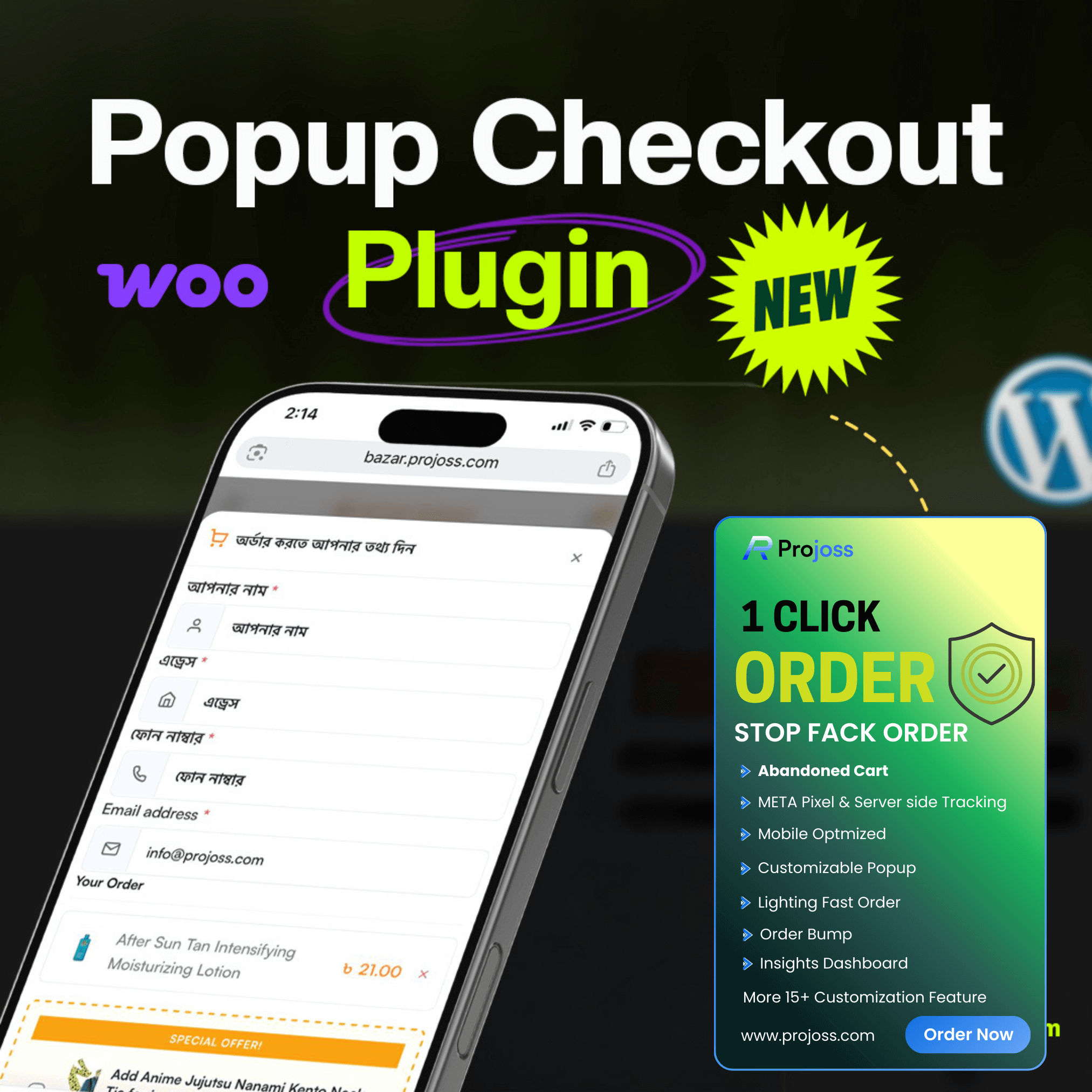
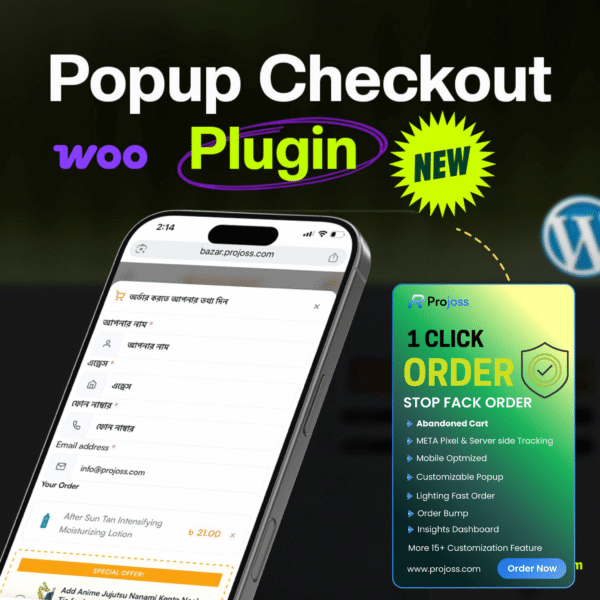
Are you losing customers because your checkout process is too long? Every extra page, every extra click costs you real money. Popup Checkout for WooCommerce solves this problem permanently by bringing the entire checkout form directly to your customer — as a beautiful, fast-loading popup — without ever leaving the product page.
No more Cart page → Checkout page → Payment page. Just one click on the “Buy Now” button, and the order is done. It is that simple.
This plugin is trusted by WooCommerce store owners who want to increase conversions, reduce cart abandonment, protect their store from fraud, and understand their sales data — all from one powerful plugin.
Why Popup Checkout Will Transform Your Store
Research consistently shows that the more steps between “I want to buy” and “Order placed”, the more customers you lose. The standard WooCommerce checkout has at least 3 pages. Our popup checkout has exactly 1 step. The result is dramatically higher conversion rates, especially on mobile devices where patience is low and distractions are high.
Beyond just the popup, this plugin comes packed with a full suite of business tools — anti-fraud protection, abandoned cart tracking, order bump upsells, analytics integrations, and a detailed insights dashboard. Everything a serious WooCommerce store needs is built right in.
Complete Feature List
🛒 Instant Buy Now Popup Checkout
When a customer clicks the Buy Now button, a professional checkout popup opens instantly on the same page. The product is automatically added to cart. The customer fills in their details and places the order — all without any page redirect. This single feature alone can dramatically reduce your cart abandonment rate.
🔘 Buy Now Button — Product Pages
A fully customizable Buy Now button is automatically added to every single product page next to the Add to Cart button. You can control the exact position — after the Add to Cart button or after the entire Add to Cart form. Button text, color, size, font weight, padding, radius, width, and margins are all fully configurable from the settings panel.
🏪 Buy Now Button — Shop & Archive Pages
Show a Buy Now button on your shop page, category pages, and archive pages so customers can purchase without even visiting the individual product page. All styling settings apply independently for shop buttons. Control width, alignment (left, center, right), display type, and margins separately from the product page button.
📦 Shortcode Support — Place Buttons Anywhere
Use shortcodes to place Buy Now buttons on landing pages, blog posts, Elementor sections, Gutenberg blocks, sidebar widgets, or anywhere else on your site:
- [popup_buy_now_button] — Buy Now button for the current product page
- [popup_buy_now_button product_id=”123″] — Button for any specific product anywhere on site
- [popup_buy_now_shop_button] — Shop-style button for archive/loop templates
- [popup_buy_now_shop_button product_id=”456″] — Shop button for a specific product
This is ideal for paid ad landing pages where you want to drive customers directly to a conversion-optimized purchase flow.
📱 Variable Product Support
The Buy Now button intelligently detects variable products. It stays disabled until the customer selects all required variation options such as Size and Color. Once a valid variation is chosen, the button activates automatically and the correct variation is added to the cart when the popup opens. No invalid orders, no confusion.
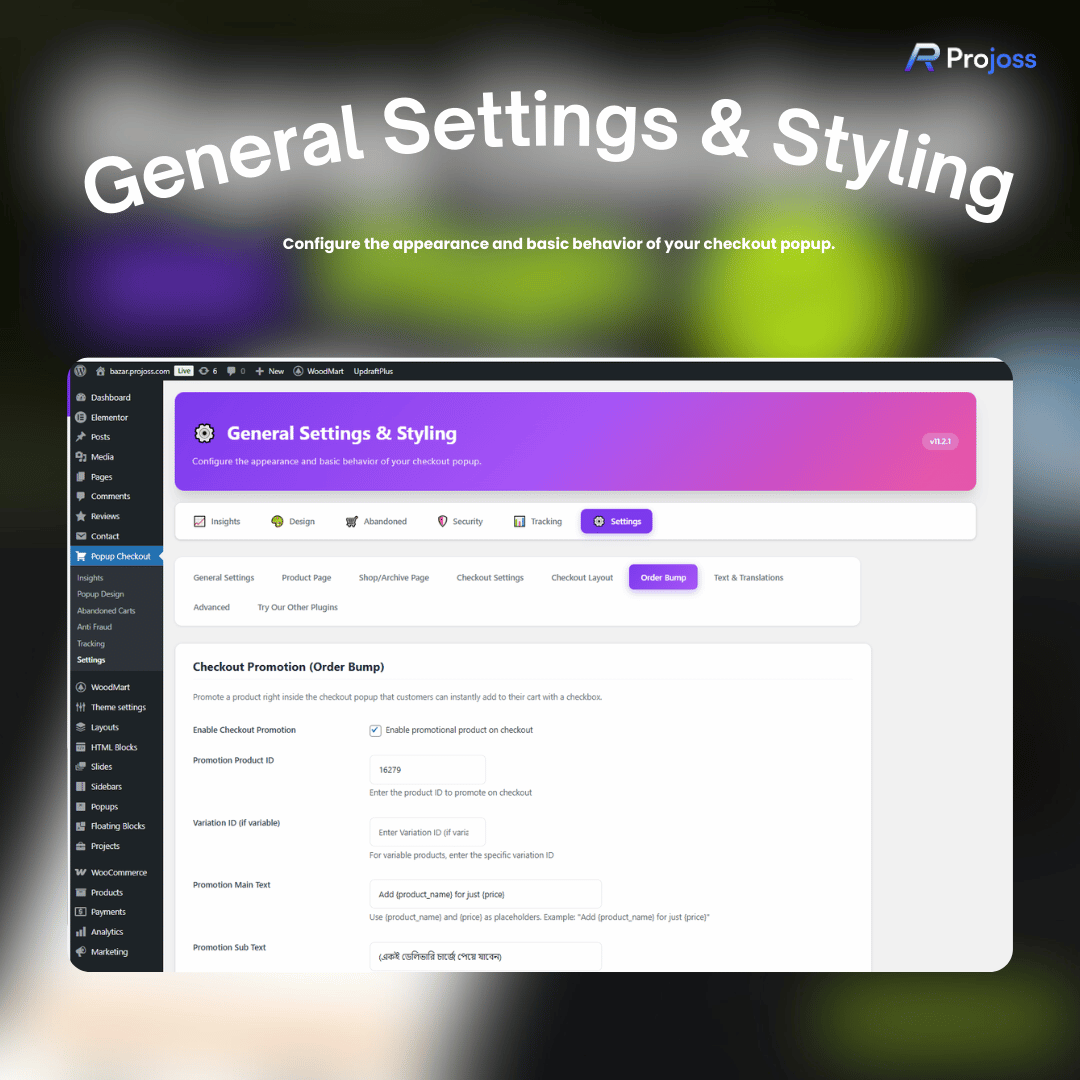
🎁 Order Bump — Checkout Upsell / Cross-Sell
Increase your average order value by promoting an additional product directly inside the checkout popup. The customer sees a checkbox offer and can add the bonus product to their order with a single click — no extra pages, no interruption to the purchase flow. You can fully customize the offer product, main text, sub text, and price display. Works with both simple and variable products.
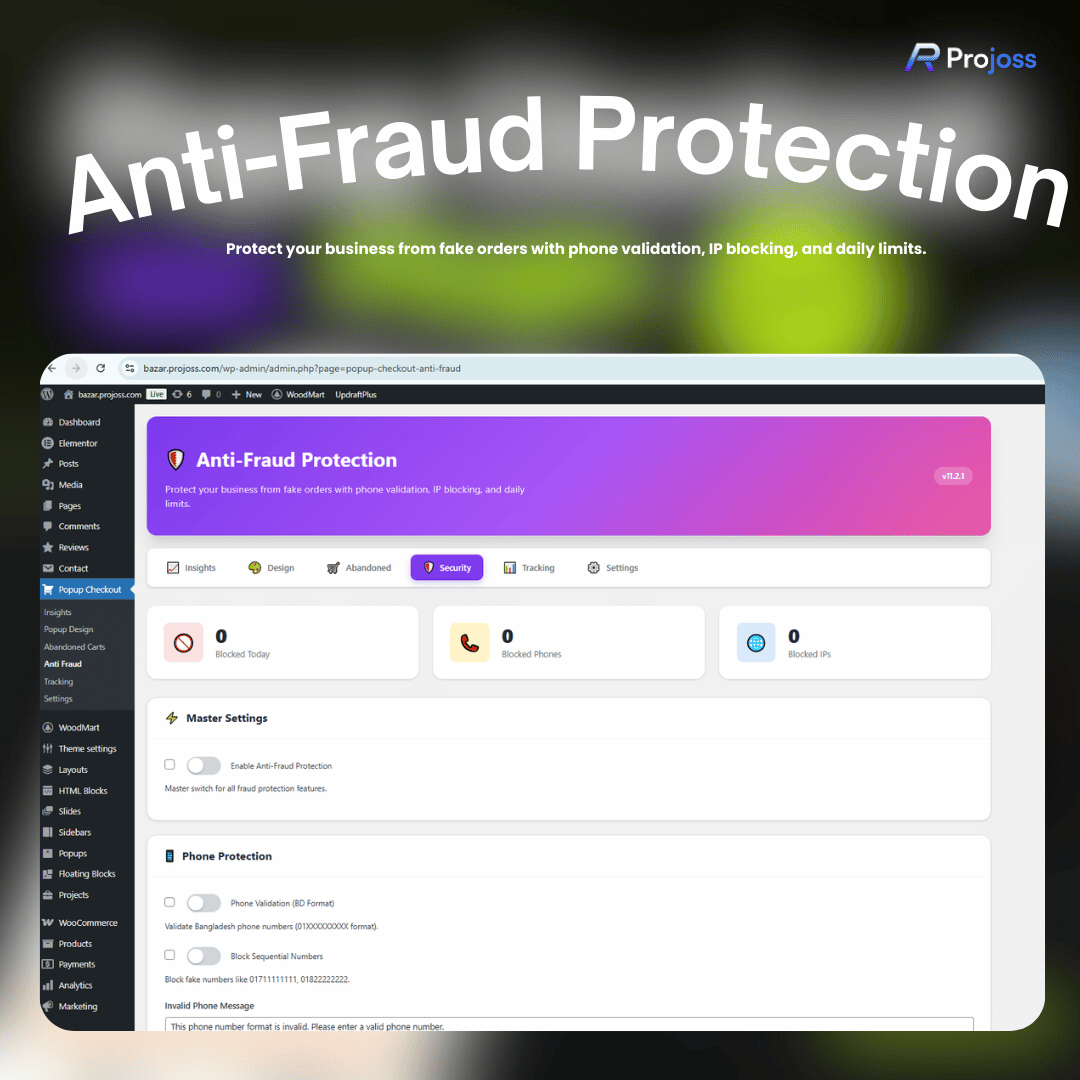
🛡️ Advanced Anti-Fraud Protection
Fake and duplicate orders are a serious problem for WooCommerce stores, especially COD (Cash on Delivery) businesses. This plugin includes a comprehensive fraud prevention system:
- Bangladesh phone number format validation — only accepts valid 01XXXXXXXXX numbers
- Block sequential and repetitive fake numbers like 01711111111 or 01822222222
- Set a daily order limit per IP address to prevent bulk fake orders
- Manually blacklist specific phone numbers with a reason note
- Manually blacklist specific IP addresses with a reason note
- Order Cooldown system — prevent the same phone number, IP address, or billing name from placing another order within a configurable time period (minutes, hours, or days)
- All error messages are fully customizable so you control exactly what the customer sees
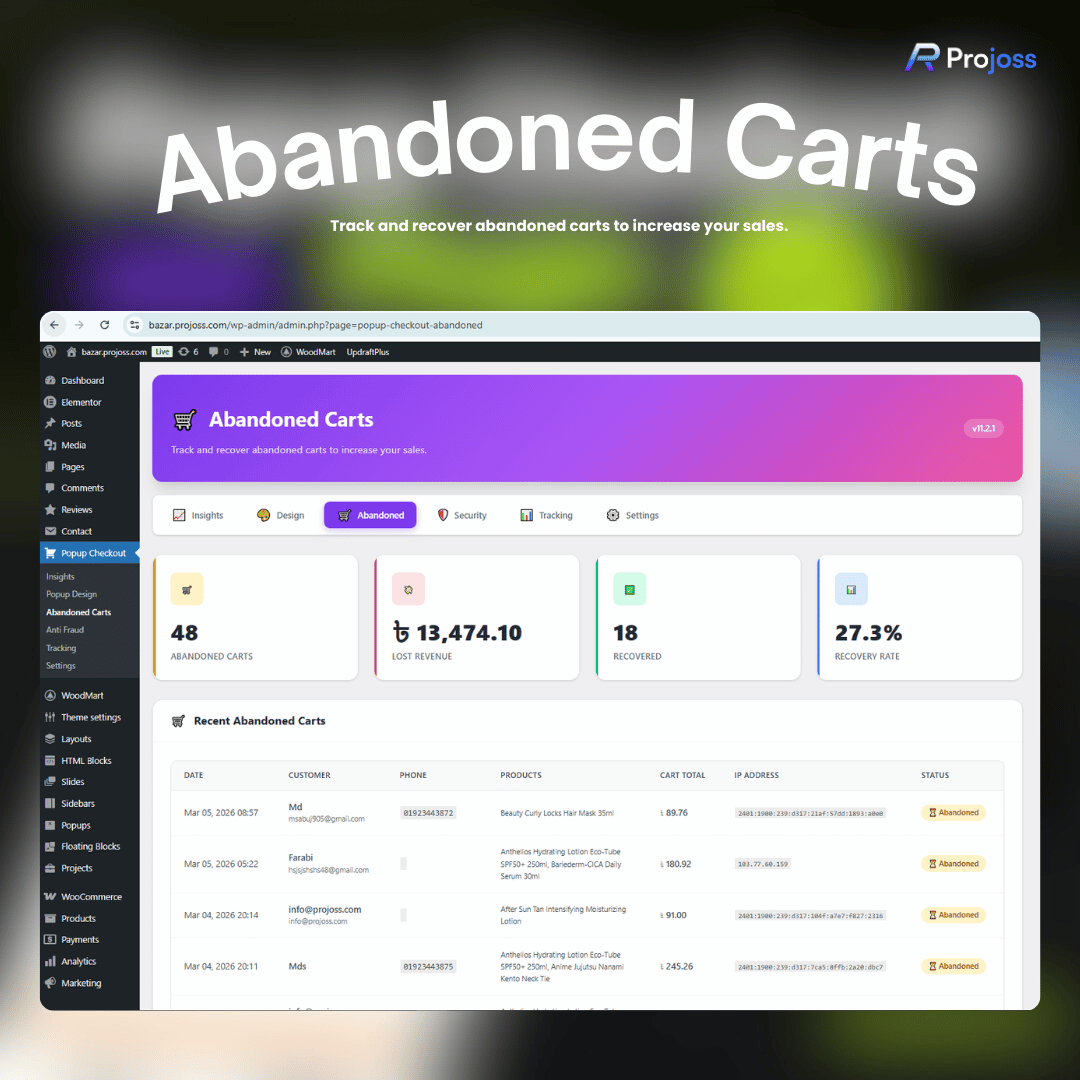
🛒 Abandoned Cart Tracking & Recovery
When a customer opens the popup, starts filling in their name, phone, or email, but then closes the popup without completing the order — the plugin automatically captures and saves their information. From the Abandoned Carts admin page you can see:
- Customer full name
- Phone number
- Email address
- Products they had in their cart
- Total cart value
- IP address
- Date and time of abandonment
- Recovery status (abandoned vs recovered)
When a customer later completes their order, the cart is automatically marked as recovered. You can track your recovery rate directly from the dashboard.
📊 Insights & Analytics Dashboard
A dedicated Insights page in the admin panel shows you real-time performance data:
- Today’s popup opens
- Today’s total orders from the popup
- Today’s total revenue from the popup
- Average order value
- Top 5 best-converting products over the last 30 days with order counts
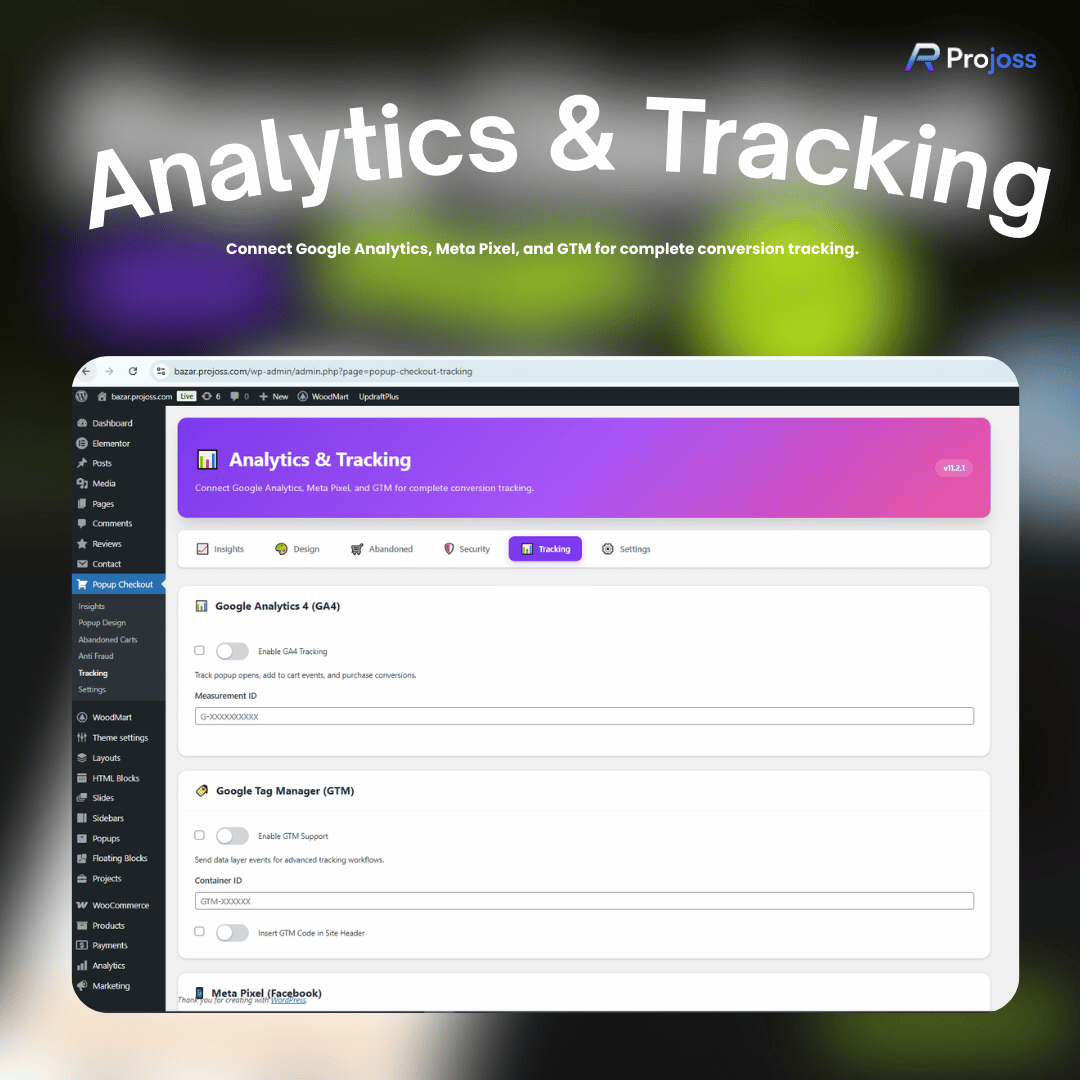
📈 Google Analytics 4, GTM & Meta Pixel Integration
Connect your tracking tools directly from the plugin settings panel — no need to manually add code:
- Google Analytics 4 (GA4) — tracks popup opens, add to cart, and purchase events
- Google Tag Manager (GTM) — sends data layer events for advanced tag workflows, with option to auto-insert GTM code in your site header
- Meta Pixel (Facebook/Instagram) — tracks conversions for ad campaigns
- Meta Conversions API (CAPI) — server-side tracking that bypasses ad blockers and iOS 14.5+ restrictions for maximum accuracy
💳 Full Payment Gateway Control
Works with every WooCommerce-compatible payment gateway including Cash on Delivery, Stripe, PayPal, bKash, Nagad, SSLCommerz, and any other gateway that follows WooCommerce standards. From the Settings panel you can select exactly which payment methods appear inside the popup — giving you full control over the customer’s payment options.
🏷️ Built-in Coupon / Promo Code Field
A dedicated coupon input field is included inside the popup checkout. Customers can apply discount codes without any extra steps. The coupon button is fully customizable — text, background color, font size, border radius, margin, and padding are all separately configurable.
🎨 Complete Button & Popup Customization
Every visual element of the plugin can be customized from the admin settings without touching any code:
- Buy Now button — color, font size, font weight, padding (top/right/bottom/left), border radius, width, margins, position on product page
- Shop page button — all the same options plus alignment and display type
- Place Order button — color, font size, font weight, padding, optional pulse animation
- Coupon button — color, font size, border radius, margin, padding
- Loading animation — enable/disable with configurable delay in milliseconds
- Custom CSS editor with syntax highlighting for advanced styling
🔄 Drag and Drop Checkout Section Ordering
Rearrange the sections of the checkout popup in any order you prefer using a simple drag-and-drop interface in the admin panel. You can reorder: Product Summary, Billing Details, Shipping Method, Payment Method, Order Bump, and Order Summary.
📐 Flexible Field Layout Options
Choose how billing fields are displayed inside the popup:
- Standard — all fields full width, one per row
- Two Column — First/Last name and address fields displayed side by side
- Compact — all fields at half width for a more condensed form
👁️ Field Visibility Manager
Control exactly which fields appear in your popup checkout. Independently show or hide: Name field, Phone field, Email field, Address field, and Order Note box. Unchecking any field completely removes it from the popup — useful for stores that only need minimal customer information such as COD delivery businesses.
🌐 Full Text & Translation Control
Every piece of text visible to the customer in the popup can be changed from the settings panel without needing translation plugins or .po files. Customize: popup title, Delivery Information heading, Name/Phone/Address/Email field labels, Shipping Method title, Payment Method title, Order Note label, Coupon field placeholder, and the trust text below the Place Order button.
📱 Mobile-First Responsive Design
The popup is designed with mobile shoppers as the priority:
- Optional fullscreen mode on mobile for a native app-like experience
- Sticky floating Place Order button that stays fixed at the bottom of the screen while the customer scrolls through the form
- Smart SVG icons on all input fields (name, email, phone, address, company) for better visual clarity
- Sticky mobile Buy Now bar that shows product name, price, and a Buy Now button
🎯 Popup Design Settings
Control additional popup behavior from the dedicated Design settings page:
- Fullscreen mode on mobile devices
- Sticky Place Order button at the bottom of the popup
- Shake animation on the Place Order button to attract attention and improve click rates
- Pulse animation option on the Place Order button for higher conversion
- Custom trust/confirmation text displayed below the Place Order button
🚚 Shipping Settings
The popup supports all WooCommerce shipping methods and zones. You can optionally hide the “Ship to a different address?” checkbox if you want to keep the form clean and simple — useful for COD stores where shipping and billing addresses are always the same.
⚙️ Admin Panel — 6 Powerful Sections
📈 Insights — Today’s stats, revenue, and top products dashboard.
🎨 Popup Design — Fullscreen, sticky button, shake animation, and trust text settings.
🛒 Abandoned Carts — Full list of abandoned carts with customer details, cart value, and recovery tracking.
🛡️ Anti Fraud — Phone/IP blocking, order cooldown, daily limits, and all fraud rules.
📊 Analytics & Tracking — GA4, GTM, Meta Pixel, and Conversions API setup.
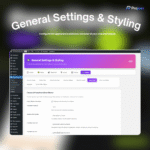
⚙️ Settings & Styling — Complete control over buttons, layout, fields, text, payment methods, and custom CSS.
💰 Pricing Plans
📅 6-Month Plan — ৳499
Perfect for new stores. All core features included. Valid for 6 months with updates and support. 1 website license.
📅 1-Year Plan — ৳999
Great for growing stores. All core features included. 1 full year of updates and support. 1 website license.
♾️ Lifetime Plan — ৳1,999
Best value for established stores. All features included. Lifetime updates and support. 1 website license. All future features free forever.
👨💻 Developer Lifetime Plan — ৳3,999 ⭐ Ultimate Value
Built for agencies and developers. All features included. Lifetime updates and support. Unlimited website licenses. Deploy on as many client or personal sites as you need. All future features free forever. Priority customer support.
❓ Frequently Asked Questions
Q: Does this plugin work with variable products?
A: Yes. The Buy Now button detects variable products and remains disabled until the customer has selected all required variation options such as Size and Color. Once a valid variation is chosen, the button activates and the correct variation is automatically added to the cart when the popup opens. This ensures no invalid or incomplete orders are placed.
Q: Which payment gateways does the plugin support?
A: The plugin supports any payment gateway that is compatible with WooCommerce, including Cash on Delivery, Stripe, PayPal, bKash, Nagad, SSLCommerz, and many others. From the settings panel you can also choose exactly which payment methods are displayed inside the popup — so you are not limited to showing all gateways.
Q: Can I customize the Buy Now button text, color, and size?
A: Yes, fully. From the Settings panel you can customize every aspect of every button — text label, background color, font size, font weight, padding (top, right, bottom, left), border radius, width, and margins. There are separate settings for the Product Page button, Shop Page button, Place Order button, and Coupon button. No coding required.
Q: What is the Order Bump feature and how does it work?
A: Order Bump is a checkout upsell feature that displays a special offer product inside the popup checkout. The customer sees a checkbox that says something like “Add [Product Name] for just ৳X” and can add it to their order with one click. You set the product, the main text, the sub text, and the price display from the settings. This is proven to increase average order value by 15–30% without requiring any extra effort from the customer.
Q: How does the anti-fraud system work?
A: The anti-fraud system has multiple layers. It validates Bangladesh phone numbers (01XXXXXXXXX format), blocks sequential and repetitive fake numbers, limits the number of orders from a single IP address per day, and lets you manually blacklist specific phone numbers and IP addresses from the admin panel. The Order Cooldown feature prevents the same customer (identified by phone, IP, or name) from placing another order within a set time period that you configure.
Q: What is the Order Cooldown feature?
A: Order Cooldown is an anti-spam measure that prevents the same customer from placing multiple orders within a short time period. You can set the cooldown duration in minutes, hours, or days, and choose whether to match by IP address, phone number, or billing name (or any combination). When a customer tries to place an order too soon after their previous one, they see a custom error message that you configure.
Q: How does abandoned cart tracking work?
A: When a customer opens the popup and starts typing their name, phone, email, or address but then closes the popup without completing the order, the plugin automatically saves their information. You can view all abandoned carts from the Abandoned Carts admin page. When a customer later completes an order with the same phone or email, the cart is automatically marked as recovered and your recovery rate is updated.
Q: Can I use this on a landing page or Elementor page?
A: Yes. Use the shortcode [popup_buy_now_button product_id=”123″] on any page, post, Elementor section, Gutenberg block, or widget area. Replace 123 with your actual product ID. This is perfect for running Facebook or Google ad campaigns that send traffic to a custom landing page with a direct buy button.
Q: Does the popup work with all WooCommerce themes?
A: Yes. The plugin has been tested with all major WooCommerce themes including Astra, Woodmart, OceanWP, GeneratePress, Flatsome, and Storefront. Since the popup renders outside the normal page flow, it works independently of your theme’s layout and styling.
Q: Is the plugin mobile friendly?
A: Yes, it is built mobile-first. The popup is fully responsive and includes a fullscreen mode for mobile devices. There is also an optional sticky floating Buy Now bar that appears at the bottom of the screen on mobile, showing the product name, price, and a Buy Now button. The Place Order button can also be set to stay fixed at the bottom of the popup while the customer scrolls through the form.
Q: Can I hide specific checkout fields I don’t need?
A: Yes. The Field Visibility Manager in the Settings panel lets you independently control the visibility of Name, Phone, Email, Address, and Order Note. Unchecking any field completely removes it from the popup checkout form. This is useful for digital product stores or COD stores that only need minimal customer information.
Q: Can I change the order of the checkout sections?
A: Yes. The Checkout Layout settings include a drag-and-drop section reordering interface. You can arrange Product Summary, Billing Details, Shipping Method, Payment Method, Order Bump, and Order Summary in any order that works best for your customers and conversion goals.
Q: Does the plugin support Google Analytics 4 and Meta Pixel?
A: Yes. From the Analytics & Tracking admin page you can connect Google Analytics 4 with your Measurement ID, Google Tag Manager with your Container ID, and Meta Pixel with your Pixel ID. Meta Conversions API (CAPI) is also supported for server-side tracking that works even when customers use ad blockers or are on iOS 14.5+ devices.
Q: What is the difference between the Lifetime plan and Developer Lifetime plan?
A: Both plans include all features with lifetime updates and support, and all future features free forever. The Lifetime plan (৳1,999) covers 1 website. The Developer Lifetime plan (৳3,999) covers unlimited websites — perfect for web developers, agencies, or store owners who run multiple WooCommerce sites and want to deploy the plugin on all of them without paying again.
Q: What are the minimum requirements?
A: WordPress 5.2 or higher, PHP 7.4 or higher, WooCommerce (latest recommended). Tested up to WordPress 6.9. Works with all recent WooCommerce versions.
Q: Will the plugin slow down my website?
A: No. The popup checkout form is loaded via AJAX only when the customer clicks the Buy Now button — nothing extra is loaded on the page until that moment. The plugin scripts and styles are optimized and only load on pages where they are needed.
Q: Can I add custom CSS to style the popup my way?
A: Yes. The Settings panel includes a Custom CSS editor with full syntax highlighting. Any CSS you write there is applied directly to the popup checkout. This gives you complete control over advanced visual customizations without editing any plugin files.
🔑 Search Keywords
WooCommerce popup checkout, buy now button WooCommerce, instant checkout WooCommerce, one click checkout WooCommerce, WooCommerce order bump, checkout popup plugin WordPress, WooCommerce direct checkout, reduce cart abandonment WooCommerce, WooCommerce conversion optimization, fast checkout WooCommerce, WooCommerce anti fraud plugin, bKash WooCommerce checkout, Bangladesh WooCommerce plugin, abandoned cart WooCommerce, popup buy now shortcode, WooCommerce upsell checkout, WooCommerce sales booster, COD checkout popup, Elementor buy now button, GA4 WooCommerce plugin, Meta Pixel WooCommerce, WooCommerce checkout customizer, quick buy WooCommerce, WooCommerce skip cart checkout, single page checkout WooCommerce



 WhatsApp
 Messenger
 Refer & Earn
 Official
 Instant
 Priority
 Safe &





Reviews
There are no reviews yet.